
HOW-TO · AUTOMATION
Automate Grocery Shopping — Without Losing Control Over What's in Your Cart
MindyCart automates the two most time-consuming parts of grocery shopping — deciding what to eat and building the cart — while leaving the login, review, and checkout in your hands. $19/month after a 7-day free trial.
By Colton MilbrandtFounder, MindyCart
Updated August 28, 2026How we verify every number
The short answer
MindyCart sits deliberately at level 3 of automation: it plans the week, builds the list, and fills a Walmart cart — you keep approving the plan, reviewing the list and cart, logging in, and checking out. Full end-to-end automation, including checkout, doesn't credibly exist at major retailers yet.
What does it actually mean to “automate” grocery shopping?
Grocery shopping breaks into a few distinct jobs: deciding what to eat, writing the list, finding each item, filling the cart, and checking out. “Automate” means handing some of those jobs to software. It does not have to mean all of them at once, and today, it shouldn't — the honest answer is that full end-to-end automation, including checkout, doesn't credibly exist at major retailers yet. MindyCart automates planning, list-building, and cart-filling; you keep review, login, and checkout.
How much of the process can really be automated today?
Each level automates more of the job — MindyCart sits deliberately at level 3, not level 4.
Plain shopping lists
Automates: Keeping a running list, sometimes shared across a household
Still yours: Deciding what to eat, finding items, filling the cart, checkout
List-to-cart tools
Automates: Turning a list you already wrote into cart items at one or more stores
Still yours: Deciding what to eat, writing the list, checkout
Plan-plus-cart
MindyCartAutomates: Planning the week with overlapping ingredients, building the list, filling and checking a Walmart cart
Still yours: Approving the plan, reviewing the list and cart, login, checkout
Full autonomy
Automates: Would include checkout and payment with no review step
Still yours: Doesn't credibly exist at major retailers today
It is also the level people actually trust: according to Walmart's 2025 Retail Rewired Report, 47% of shoppers trust a digital agent for essentials within a budget, while 46% said they're unlikely to trust an agent with an entire shopping trip. According to Grocery Dive and Dunnhumby (April 2026), only 29% of shoppers are excited about agentic shopping, with close to half calling it intrusive or unnecessary — evidence against overselling “set and forget” automation that most people don't actually want yet.
Why one store (Walmart) beats multi-store price-hunting automation
Some automation tools compare prices across several retailers and buy the cheapest match at each one. That adds complexity and fragility — more logins, more carts, more places a substitution can go wrong — for savings that mostly come from chasing individual item prices. MindyCart's savings come from a different lever: planning a whole week of dinners so ingredients overlap across meals, which only works cleanly against one catalog. One store, one cart, one checkout stays simpler and more reliable than automation spread across several retailers at once.
Is automated grocery shopping safe? What about my payment info?
Automation stops before it touches your money
MindyCart never asks for your Walmart password or your payment details, and nothing purchases without you reviewing the actual cart first. It builds a claim link to a pre-filled cart; you open it, log in to your own Walmart account, and pay yourself. Automating the planning and cart-building steps doesn't require automating the parts that touch your money.
What does an automated week actually save you?
Two real weeks Mindy planned and priced at live Walmart prices, checked 2026-08-27. Walmart prices are real, checked on the date shown, and vary by store and over time. See how we calculate for checkout vs. consumed cost/serving definitions.
A week of family dinners around $100.
“Five filling, kid-friendly dinners for a family of four, around $100.”
- Spaghetti and Meat Sauce
- Beef Tacos
- Chicken and Rice Skillet
- Baked Pork Chops with Mashed Potatoes
- Chili Cornbread Skillet
Checkout / serving
$5.14
Consumed / serving
$2.41
42-item Walmart cart, every item checked at the store · priced 2026-08-27
The cheapest realistic week we could ask for.
“Five dinners for a family of four, as cheap as possible — beans, rice, pasta, real filling dinners.”
- One-Pot Spaghetti and Meat Sauce
- Bean and Rice Tacos
- Beef and Bean Chili
- Pasta e Fagioli
- Chicken and Rice with Black Beans
Checkout / serving
$3.86
Consumed / serving
$2.49
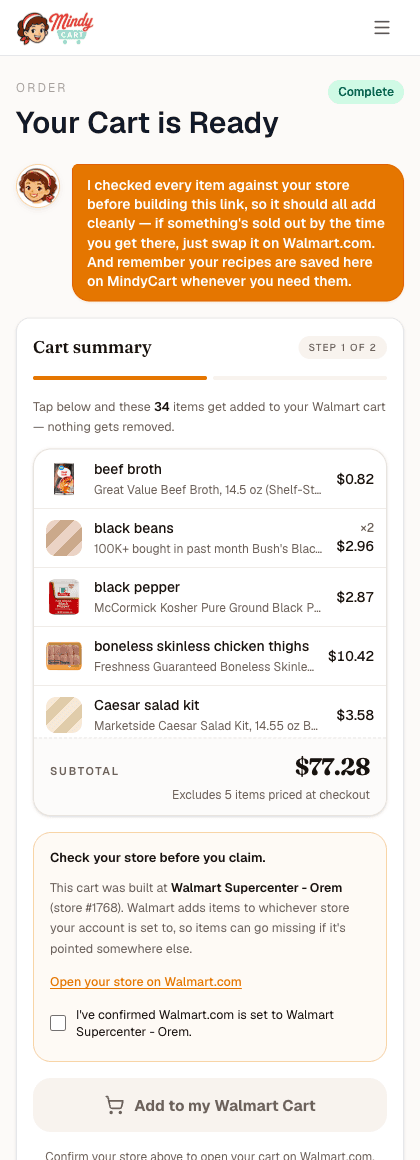
34-item Walmart cart, every item checked at the store · priced 2026-08-27
What automation saved here is time: no manual planning, no manual list-writing, no manual item-by-item cart search — the person still reviewed the plan and list, then logged in and checked out themselves.
Will it just keep reordering the same things automatically?
No. Each week is a fresh plan, built for what you tell Mindy you want that week — or, if you ask for “your usual,” a fresh preference-aware plan rather than a silent replay of last week's cart. Automation here means less manual work per week, not a recurring order you can no longer see or change.
Frequently asked questions
Does “automate” mean I lose say in what we eat?
No. You approve the meal plan before any list is built, and you can still remove, re-add, adjust quantity, mark items organic, or add something extra on the list before shopping starts.
Can I use this for delivery, not just pickup?
Yes. MindyCart hands off a claim link to a pre-filled Walmart cart, and you choose pickup or delivery on Walmart.com yourself.
How is this different from Instacart's automation?
Instacart-style automation typically starts from a list you already wrote. MindyCart starts a step earlier: it plans the week's meals, then builds the list and the cart from that plan.
What happens if the AI gets an item wrong?
Every item is checked at your store before the cart is handed over. If Mindy can't find something, she substitutes based on your preferences or flags the item by name instead of quietly leaving it out.
Related pages
- Can AI do my grocery shopping? — the honest yes-and-no, with the evidence behind it
- Meal planner that fills your Walmart cart — what Mindy plans and fills, week to week
- How MindyCart works — what Mindy does and does not do
- How we calculate — sources and math behind every cost-per-serving figure
- Methodology — how MindyCart sources and verifies the numbers on this page

Hire Mindy · 7 days free
Ready to automate the planning and the cart, and keep the checkout?
- Tell Mindy what dinners you want this week.
- She plans the week and fills your Walmart cart.
- You review it and check out on Walmart yourself.
Already a member? Get the app.App Store (iPhone)Google Play (Android)
Written by
Colton Milbrandt, Founder of MindyCart
I built MindyCart and run every measured week on it myself. Methodology and editorial policy explain how MindyCart sources, verifies, and dates every number it publishes.